




Sharing My Personal Far Manager'S Color Theme Heavily Inspired By The Early 90s
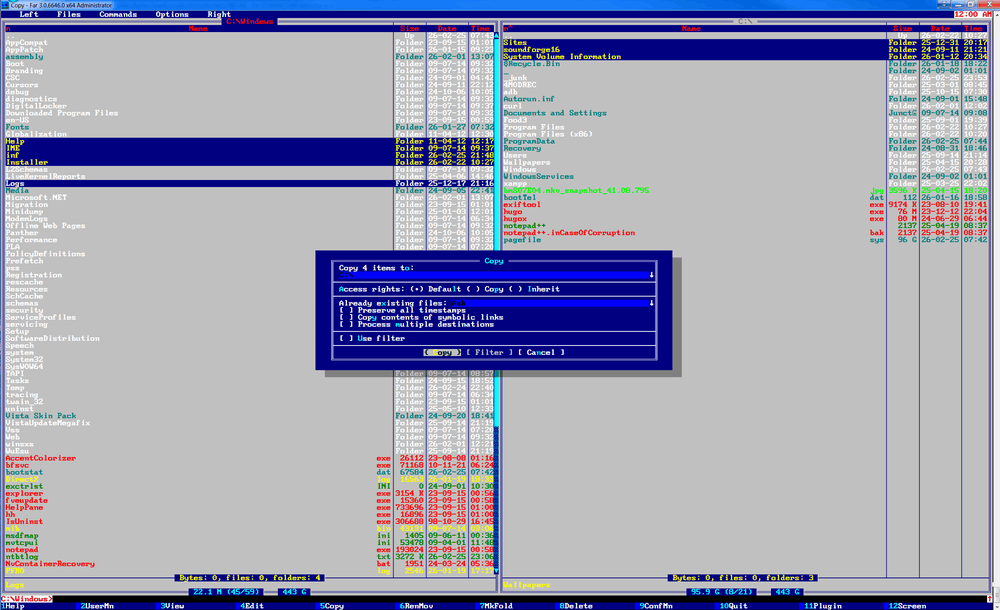
I already wrote about magnificent Far Manager [in the past]
.
It is ridiculously fast orthodox text file manager, which can deliver Linux-like experience to your Windows 7 machine.
Version 3.x is way more advanced than Linux’s [Midnight Commander]
.
Since i spent quite much time in appointed file manager and even caught myself couple of times
doing coding works right in the internal editor instead of VS Code…
And then i thought: “why don’t i make my spending time in the environment more pleasant for my eye”.
Besides, i am pretty tired of classic blue and white theme of application,
so i’ve decided to do my own version which matches my preferences.
Theme can be set by pressing:
F9 => Options => Colors => Themes
Color presets are located here:
C:\Program Files\Far Manager\Addons\Colors\Interface\[theme-name].farconfig
You can obtain theme by downloading it from [here] .



