Tada! The Meals on wheels project has finally been deployed to the good old interwebs! In this endeavor, I participated as a full-stack developer, wearing the hats of a frontend developer, backend developer, DevOps engineer, and designer. Both the frontend and backend codebases are hosted on GitHub. The backend is containerized using Docker and deployed on Render.com, which also hosts PostgreSQL database. This web application allows cafe/restaurant staff to do plenty of things:
A quick note, mostly to myself, just to digest the progress. Finally i came up with barebones of the project, i’ve ditched React in favor of [Svelte]
. It has cleaner logic and structure. Webpack bundler will be replaced by [Vite]
. It is way faster and more modern. Database choice remains the same, it is PostgreSQL. JavaScript will be replaced by TypeScript as a more strict, statically typed superset language.
Right side flyout with project information triggered upon mouse hover has been added. Also i brought some improvements to the 8-bit mode: mobile phones are affected by the switch too. Some various aesthetic fixes here and there.
So, enjoy the page, Cool!
UPDATED ON: 2026-05-15
I have implemented special mode for low spec computers. Now, there is an 8-bit lo-fi switch in the header targeted to improve speed on potato puters. Mode disables all visual niceties in favor of better performance.
Breakdown of what is disabled on the website:
all animations all transitions all box-shadows various filters custom scrollbar audio effects right info flyout Hotkey: [CTRL]+[SHIFT]+[8]
Now switch is visible and affects mobile devices.
I have a correct mood to make a couple of new decoration elements for the website. Two different neon glowing buttons: first one is activated on desktop upon hovering mouse cursor [neon glowing RGB edge] second one is accessible on the cell phone [rotating conic gradient] Media queries will detect resolution and show appropriate button for you. To observe the second button switch to mobile view.
TEST BUTTON: HOVER ON GENTLY DESKTOP BUTTON @property --angle {
syntax: '<angle>';
initial-value: 0deg;
transition: all 0.
UPDATED ON: 2026-05-19
Handmade retro-inspired unfolding list, code will be integrated to the website template for later reuse. Feature: hidden text in the unfolded menu is protected from being selected and copied. Not vibe-coded sh#t, mobile compatible, but who really cares?
Unfold 1
Text 1
Lorem ipsum dolor sit amet consectetur, adipisicing elit. Mollitia aperiam
repellendus, ipsum dolor sit amet consectetur, adipisicing elit. Mollitia aperiam
repellendus. Demo list text for demonstration stuff
Another one must fall on the life arena
You can't stop us, raf-raf-
Unzip me gently for some reason
Unfold 2
Text 2
Lorem ipsum dolor sit amet consectetur, adipisicing elit.
In my spare time, I realized I’ve reached a point where I’m ready to create something genuinely useful for end users. Project criteria are clear:
It must be free It must be useful for personal use It must be easy to use A free bulletin board struck me as a particularly neat idea—suggested by a friend.
In my country, there are many such platforms, but nearly all suffer from issues like:
If you don’t like the flicker of Robotron greenish displays on the page, you can read article in [plain txt file]
INTRODUCTION: WHO THE HELL ARE YOU TO JUDGE LIKE THAT? Here we`ll dive into IT industry and what is happening in it recently and we`ll surely dot the i`s and cross the t`s in this not-so-brief note and close questions related to this department ones and for all.
My computer knowledge starts from MSDOS 5.
UPDATED ON: 2025-11-28
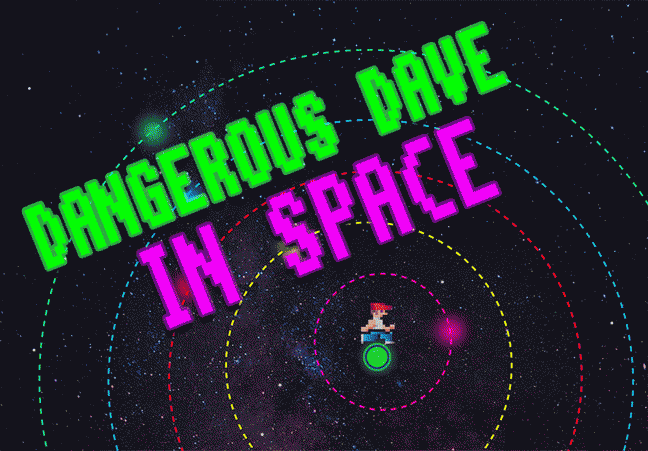
Dangerous Dave is a small demonstration of JavaScript capabilities. Control Dangerous Dave in wacky space riding green glowing blob by means of:
[▲] [▼] [◄] [►] arrow keys for movement [Spacebar] for laser shot [F8] to turn on/off orbiting planets [Enter] to become as cool as Duke Nukem ▀ FEATURES no heavy frameworks and dependencies, just pure JavaScript compact size, less than 500Kb including graphics and audio tiny core only 35Kb!
Ok then, back to the main topic of this website.
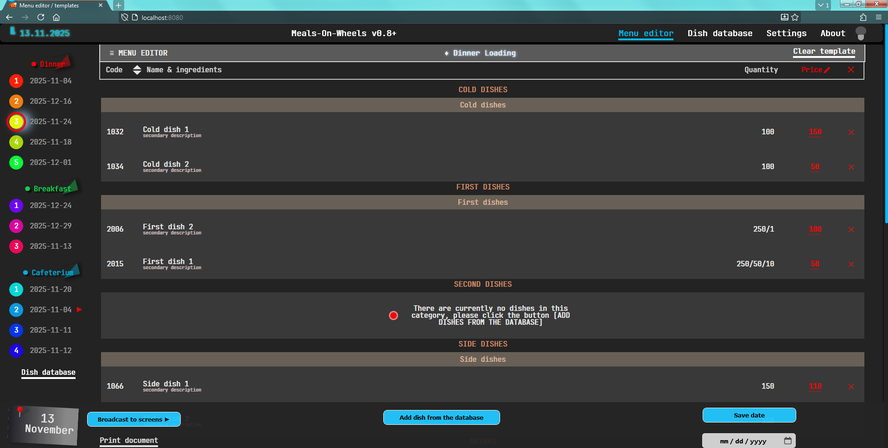
[Dinning menu]
for restaurants has matured and transformed into something more serious. Here are some fresh screens from the development fields featuring improved GUI and overall ergonomics with dark/light theme and custom cursor. Currently there is no any github repo because i work on the project locally. Maybe in the upcoming future i will share the source code online.
This is a solution for Webpack-based project which use PUG markup instead of conventional HTML. To save setting we are using LocalStorage and Cookies.
MARKUP
li
.option-wrapper
input#customCursorToggle(type="checkbox", name="customCursorToggle")
span.label-text On/off custom cursor support CSS/SCSS
Take a note that you have to tune styles by yourself to match your project requirements. Moreover, CSS styles for toggler are not included!
html.normal-cursor,
html.normal-cursor * {
cursor: auto !important;
}
html.normal-cursor a,
html.
The reason i’ve published this blip note because one reader reported me that after my recent [decoration upgrade]
i totally f#cked up cameraphone benchmark comparison pages, where my preloader script interfered with existing functionality making images not rendered on these pages at all.
I also removed .crt class on cameraphone comparison pages to get rid of CRT monitor emulation since it is obviously not needed there. People should be able to pixel-peep without any distractions like scanlines.
UPDATED ON: 2025-04-17
Project to test JS/PHP queries in real life tasks. The “Submit Your Vote” button becomes active only after you select one of the options and enter a unique number of more than 5 digits (not letters).
TECHNOLOGY STACK
FRONTEND SIDE
HTML markup: PUG Pure JavaScript/SCSS Node.js 23.7 [hacked] Webpack 5.98 VS Code 1.93 [hacked] BACKEND SIDE
XAMPP [for making PHP 8.2 work on Windows 7] APACHE [embedded version] PostgreSQL 14 PGAdmin 6.
UPDATED ON: 2025-04-14
Testing out waters with database technologies and custom written web-based applications. This project includes the following tech:
Webpack as a module bundler to compile the whole project PUG as a modern, modular replacement for classic HTML SCSS for graphics rendering and animation [btw, no images were used] JavaScript for POST/GET queries to the PHP backend PHP to retrieve needed data from database Apache for hosting server-side logic IMPLEMENTED FUNCTIONALITY