


How To Run The Very Latest VS Code [v1.135] In Windows 7 No Matter What
![How To Run The Very Latest VS Code [v1.135] In Windows 7 No Matter What](/img/vscode/vscode.png)
UPDATED ON: 2026-09-29
We have a better workaround for the latest version [over here] .
Say you are as stubborn as myself and want to run VS Code editor in Windows 7 no matter what.
First thing to remember it will be able to run only in x64 edition of Windows 7 with all ESU patches applied.
- get already patched 1.102 version from [e3kskoy7wqk repository]
- unpack it and start application to make sure it is working
- close software, be sure it is not showing in the task manager
- download newer version, for example v1.112.01907 / [zipped VSCodium archive]
- extract archive & copy RESOURCES folder to the original 1.102 installation, replacing existing one
- execute the editor / ta-da! it works!
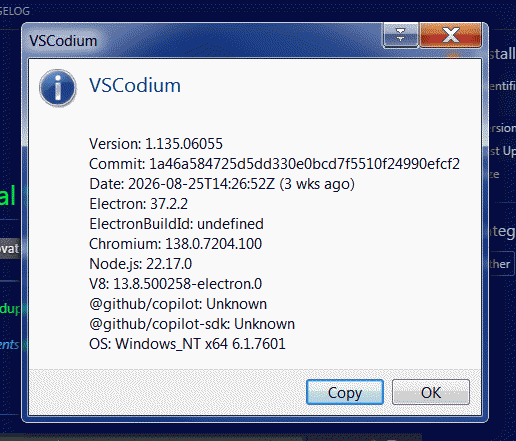
Very draft investigations pointed out that even the very latest version 1.135.06055 runs.
But my custom color theme broke in v1.135 in some places and more importantly some plugins reported errors.
However, your experience may vary, so it is worth of trying.
As for me, i would recommend to stick with version v1.108 if you want the most stability.
In the modified version, there is a noticeable issue when trying to perform a global search using [CTRL] + [SHIFT] + [F].
Instead of searching across the entire workspace, VS Code only searches through currently opened files.
The root cause of this problem is an incompatible rg.exe executable, which is located here:
YOUR-VS-CODE-DIR\resources\app\node_modules.asar.unpacked\@vscode\ripgrep-universal\bin\win32-x64
To find out release version of your RG executable.
rg.exe --version
You can obtain compatible version from previous VSCodium builds.
VsCodium v1.101.24242 contains [v13.0.0 of rg.exe]
[direct link]
Newer versions of VsCodium contain incompatible versions.
The very last compatible version is 14.1.0.
You can grab it directly from [official Github repo]
[direct link]
Second nasty problem is not working command prompt, upon pressing [CTRL] + [J] you’ll get this error:
The terminal process failed to launch: A native exception occurred during launch (Cannot launch conpty). Winpty has been removed, see https://code.visualstudio.com/updates/v1_109#_removal-of-winpty-support for more details. You can also try enabling the `terminal.integrated.windowsUseConptyDll` setting..
This occurs because of removal of Winpty component since VS Code 1.109.
So if you don’t want to deal with console issue and would like it to work right out of the box,
all you need to do is just to replace resources folder of hacked v1.102 version with resources folder taken from v1.108.
Modern windows versions use Conpty mechanism to do the job, which obviously is lacking in Windows 7.
FIRST WORKAROUND:
Let’s start with a more solid approach. Restore old working method and replace modern one.
Last version to include legacy command line component is [VSCodium-win32-x64-1.108.20787]
.
- First things first tweak VSCode settings.json file and add the following lines
"terminal.integrated.shellIntegration.enabled": false,
"terminal.integrated.windowsUseConptyDll": false
- close VS Code and check that it is fully unloaded from the memory
Ok, we have the following initial environment.
- VSCode we are hacking located at: C:\code1135
- VSCode for borrowing winpty component located at: c:\108
- Unpack [winpty-hack] to the root of the C drive
- Now we have winpty-fix.cmd and winpty-fix.js in the root of the drive C
- To patch things up execute the following line in the command prompt with administrative privileges
winpty-kit.cmd patch "C:\code1135\resources\app" C:\108
Run this patch again after every VS Code update.
Patcher is doing backups of node-pty folder & node_modules.asar file
by adding post-fix like .pre-winpty to the naming.
To restore files to initial state do this:
winpty-kit.cmd restore "C:\code1135\resources\app"
If you have an alternative naming for folders and executables fix provided winpty-fix.cmd on your own.
Beware restoration is not heavy tested, glitches can occur, use on your own risk!
SECOND WORKAROUND:
You can install compatible [Git v2.46.2]
, which contains working git-bash console and
add following lines to your VS Code configuration, to use external command interpretation
KEYBINDINGS.JSON
  {
    "key": "ctrl+j",
    "command": "workbench.action.terminal.openNativeConsole",
  },
SETTINGS.JSON
"terminal.explorerKind": "external",
Also don’t forget to setup appropriate external shell:
Settings > Terminal > Integrated > Default Profile: Windows > Git Bash
Also you can set it to PowerShell or Windows PowerShell.
By the way, [how to run PowerShell 7.6 on Windows 7]
.
Take a note that Windows 8.1 do not have annoying command line problem.
Oh, and by the way, to work with modern web projects you can grab relatively new NodeJS 23.7 from [here] .
If you are aware of another Windows 7/8 issues and have solutions for them, please [drop me a line]
and i’ll include your knowledge to this mini-FAQ for the good of all Windows 7/8 users.