


Is Optane An Obscure Relic Of The Past Or The Performance Champion Of Caching Solutions?

UPDATED ON: 2026-05-26
Finally updated an article with some recent pictures
Despite being “this kinda old”

I still prefer to stay on the edge of the technical rainbow,
so much so that even Gen Z can rarely keep up with my tech cravings.
Modern CPUs, GPUs and RAM are already very fast for my workloads.
So which part of computer has the most bottleneck currently?
In my humble opinion it is the storage media.
You may ask how about Gen5 NVME devices? They are quite there but not almost.
They are not there at least in terms of latency and random access time
when accessing data blocks of different sizes.
That’s the area where Optane technology shines.
In this quick article we will compare different types of storage from various eras
and will find out strength and weaknesses of each of them.
Just grab a cup of hot tea to continue. Let’s get started!
For real-world applications, the most important performance metrics
aren’t the heavily advertised sequential read/write speeds,
they’re drive latency and how quickly a drive can access random 4K blocks.
Only one family of drives truly excels at this: Intel’s Optane lineup.
While I’m not typically an Intel fan boy, Optane’s architecture has consistently intrigued me.
This technology is one of the most important achievements of Intel company,
along with such achievements as
Intel Pentium III and his multi-core brother Core 2 Duo.
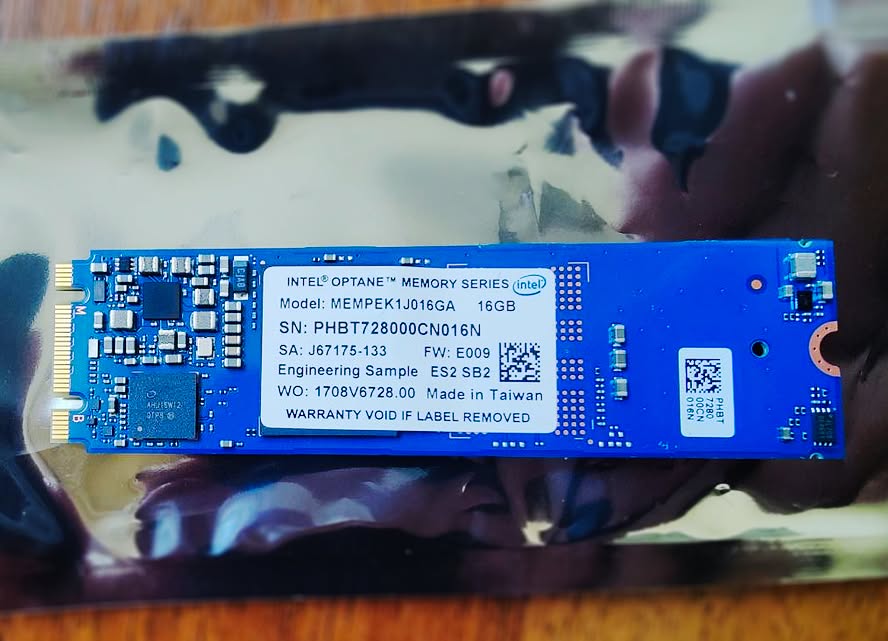
OPTANE M10 16 GB STICK PCIEv3
OPTANE P5800X 400GB PCIEv4
OPTANE’S STRONG FEATURES
- Extremely low latency 5-10µs [best in the class PCIE5 NVMEs offer only 60-70µs in real life scenarios]
- Exceptional low-queue random reads, like strong QD1 4K reads
- no dram cache to fill or flush [speed is consistent across all size of the storage]
I’ve already had a brief acquaintance with this technology by setting up a RAID 0 array out of two M10 Optane sticks.
I managed to configure a caching system and point it straight to that M10 RAID 0 setup.
The tech runs on the PCIe 3.0 bus [2017-2018], a bit dated by today’s standards, but still remarkably efficient.
Today, I’m adding another layer of madness to my storage configuration and crank it to extreme boundaries.
The M10 sticks are no slouches: they deliver around 150-200MB/s in random 4K performance,
which is better than even the most advanced Gen5 NVMe drives can offer.
Don’t forget that 16Gb M10 sticks are freaking cheap, around 4$ per module.
Also you can find 32Gb and 64Gb versions.
But is there anything better out there?
Yes: the final generation of Optane drives, released back in 2021-2022.
The models are the P5800X and P5810X. They push random 4K performance even higher and slash latency further.
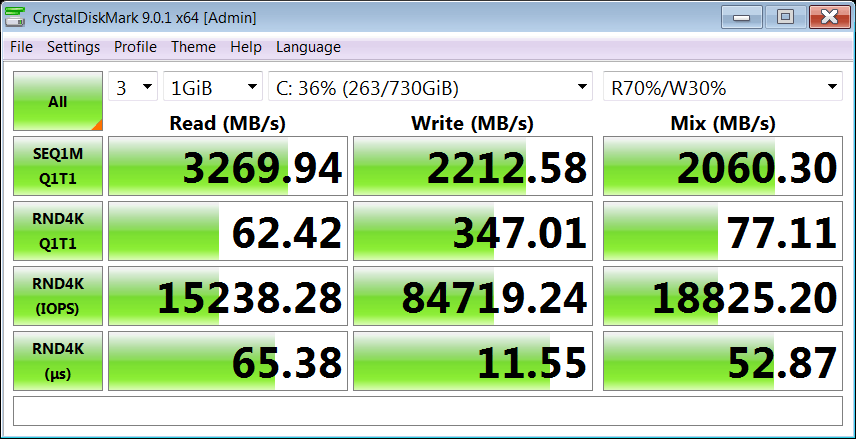
On a 7950X CPU P5800X pulls out around 400-450Mb/s on 4k blocks and has a latency of 9µs,
Latency of top of the line NVME WD SN8100 is in region of 60-80µs.
The P5810X is technically about 1µs faster in latency than P5800X, but it’s extremely rare and hard to find,
largely because it was Intel’s swan song for the technology.
Latest Optane models is like Nokia PureView 808 in the cameraphone market, total avangard,
was ahead of it’s time for at least ten years or something.
Near-mint examples routinely go for $2,000 - $3,000 on eBay.
Given the marginal gains, that’s just too steep, so I’m sticking with the 400 GB P5800X.
It’ll be more than enough for the Windows 7 installation.
My P5800x was decommissioned from Facebook, it is a new OEM version without any case,
the downside is that i can’t flash it with new firmware updates in a simple way
because it’s targeted to Facebook and requires specific treat.
What is more important to note that with the increase of CPU performance latency of
P5800X is getting better too, so technology is CPU dependent.
Gemini AI predicted that top-end Zen7 CPU will minimize software overhead to almost zero value
and in future we can observe 5µs latencies, so it’s a perfect match with Optane hardware specifications.
Here’s a breakdown of my current storage stack,
ordered from fastest to slowest in terms of 4K access time and latency:
- Fixed swap file: Mounted on a RAM disk via SoftPerfect RAM Disk [DDR5]
- OS drive: 400 GB Optane P5800X, connected to an M.2 slot via an adapter [PCIe 4.0]
- Caching system & temp folders: Optane M10 32 GB (16 GB x 2) in RAID 0, M.2 [PCIe 3.0]
- Data drive: WD Black SN8100 1 TB Gen5 NVMe [PCIe 5.0]
Testbed machine: Ryzen 7950X / X670E / 64Gb RAM DDR5
The idea is to distribute different processes across dedicated hardware to minimize
response times and push performance to its absolute limits.
I’ve also included a few speed comparisons below to make the differences
between storage tiers more visible, and to show how these technologies interact under load.
Even on systems with 64 GB+ of RAM, Windows requires a pagefile and temporary folder for memory management.
I currently use a fixed 1 GB pagefile on a Gen4 NVMe SSD, but I wanted to test whether moving it to Optane,
known for exceptional small-file performance would improve system responsiveness.
In real-world workloads, sequential throughput and large-file access times are far less critical
than 4K random I/O latency, which dominates background in OS operations.
Optane drives excel in this metric and also have one really distinctive feature
like maintaining uniform performance across the entire drive regardless of fill level or data placement.
But enough of jaw flappin, let’s dive into benchmarking.
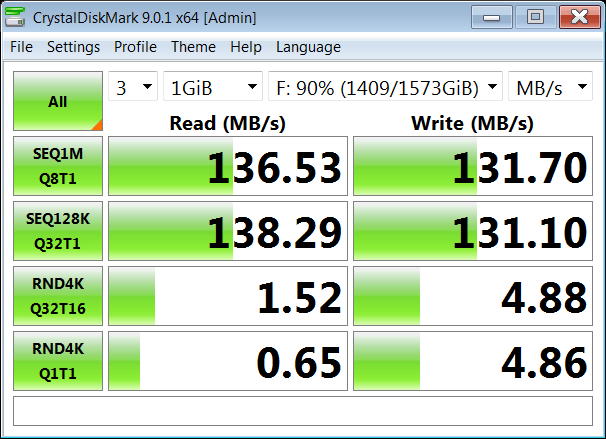
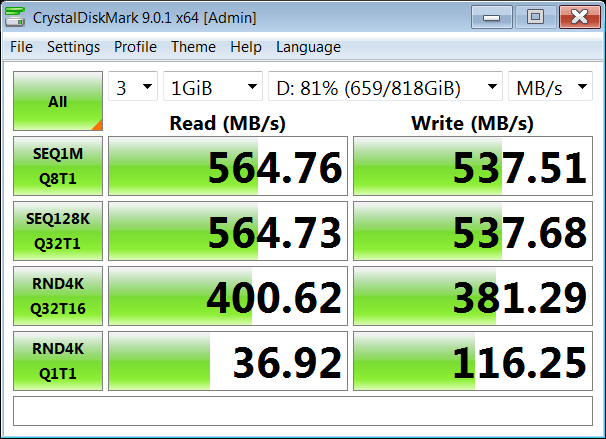
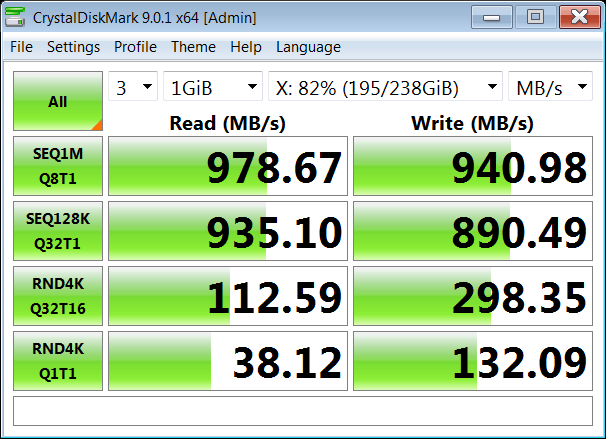
Here are some speed comparisons of different drive types.
So you can observe disposition from a broad perspective of things.
SHDD WITH SSD CACHE SATA6
GENERIC SSD SATA6
NVME USB3
SAMSUNG 980 PRO GEN4 NVME PCIEv5
It would be nice idea to test P5800X out in Windows XP SP3+ environment and see how it will go.
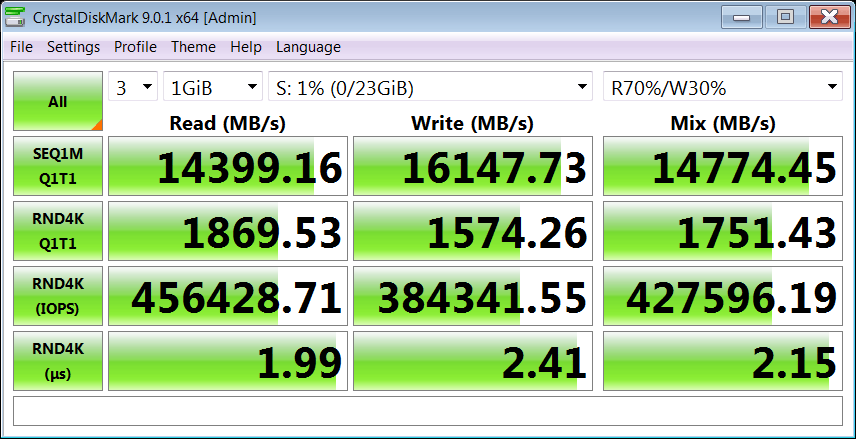
And here is a RAM disk just for kicks and giggles, HDD emulation lowers performance by around 15-20%,
I am forced to use emulation mode because otherwise Windows 7 throws a BSOD screen at boot.
RAMDISK [HDD EMULATION]
Brief conclusion
So if your primary use-case is an ultra fast responsiveness for operating system,
software or a game loading the old tech from Intel remains unbeatable even in 2026.
Stay tuned for the performance tweaks!
That’s it for today. I hope this was an interesting read, and that you picked up something useful for your own builds.
In case you didn’t notice, now there are more additional switches in the header,
one of them toggles audio playback events for GUI elements.
I in some cases they annoy me, so hotkey remedy is: [CTRL]+[SHIFT]+[M]